Free tool · runs on every plan

Most catalogues are missing alt text on
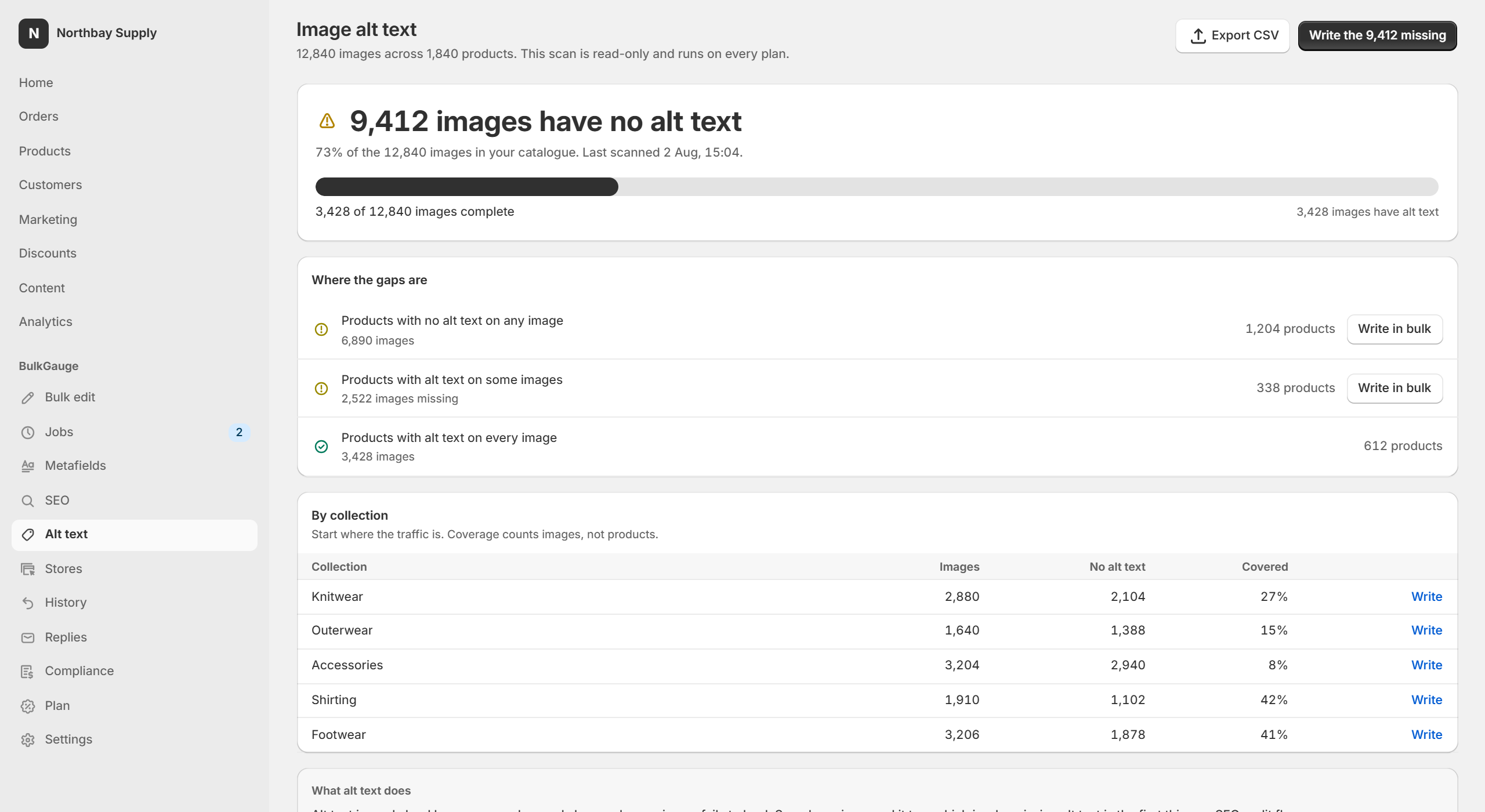
two images in three.

BulkGauge counts yours. The coverage audit reads your product images and reports how many have no alt text, broken down by product and collection. It writes nothing, costs nothing, and runs on the free plan.

Read-onlyNo per-image cost to scanEvery plan, including free
The alt text coverage audit: 9,412 of 12,840 images have no alt text, with the gap broken down by product and by collection
Why it matters

Two reasons, and only one of them is search.

Alt text is read aloud by screen readers and shown when an image fails to load. It is also read by search engines, which is why missing alt text is the first thing an SEO audit flags and why Google Images traffic tends to follow it.

Missing alt text is one of the most cited accessibility failures in ecommerce, and one of the few a merchant can fix across a whole catalogue in an afternoon.

What this is not. Alt text is one accessibility requirement among many. Writing it fixes the most common failure across a catalogue; it does not make a store accessible, and BulkGauge does not claim that it does. Any tool telling you a single feature achieves compliance is selling you something else.
Two ways to write it

One is free. The other is a penny an image, and says so before you spend it.

From a template

Free, instant, no per-image cost.

{{product.title}} — {{option.Colour}} — {{image.position}} of {{image.count}}

Writes “Merino Crew — Charcoal — 2 of 5”. Good where the images of one product differ only by angle. Poor where the subject itself varies.

Described by AI

1¢ for each description generated. An image already described is reused at no charge.

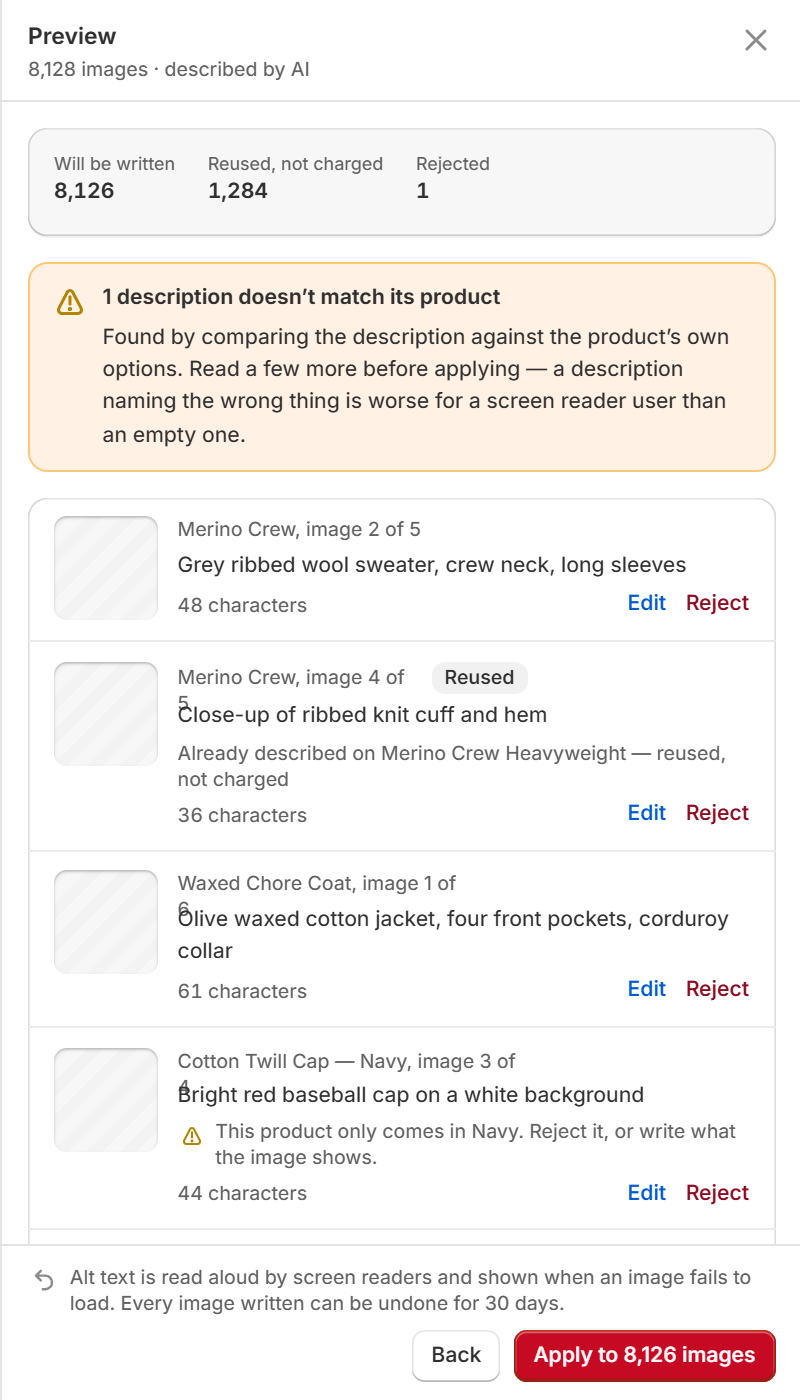
“Grey ribbed wool sweater, crew neck, long sleeves”

Reads the image and describes what is in it. Worth it for art, homeware, and anything where two photos of one product show different things.

Preview

You see the image beside the words

This is the one place a before-and-after table is useless. Every row shows the thumbnail, the description, and its length — and every row can be rewritten or rejected before anything is applied.

  • A description that contradicts the product’s own options is flagged: “this product only comes in Navy”.
  • Reject a row and the image keeps its empty alt text. Nothing is written and nothing is charged.
  • Edit a row and your words are what gets written.
  • Undo the whole job for up to 12 months, depending on your plan.
The alt text preview: each product image beside its generated description and character count, with one description flagged as not matching the product

Questions

Is the audit really free?

Yes, on every plan including Free. It is read-only — it reads your product images and writes nothing. Writing alt text in bulk needs the Growth plan.

How is the AI charge worked out?

1¢ for each description generated, on your existing Shopify invoice. Before a job runs you see the count, how many of those images are already described — those are free — and the total. You set your own monthly limit; a job that would pass it stops before it starts and offers you the two ways forward rather than charging through.

What if the AI describes something wrong?

Reject the row. It is not written and not charged. The preview flags descriptions that conflict with the product’s own options, and you can edit any row by hand before applying.

Does this make my store accessible?

No, and nobody should tell you otherwise. It fixes the most common single failure across a catalogue. Accessibility has many other requirements that no bulk tool can address.

Get your number first.

Install, open Alt text, and read the count. Decide about writing it afterwards.