Shopify app · built on Polaris

Change 892 prices in the time it takes to
open a spreadsheet.

BulkGauge adds rule-based bulk editing to the Shopify admin you already use. Filter your products, write the rule — or a chain of them — see every before-and-after value, then apply. One click undoes the whole job.

No CSV round-tripPreview before every writeUndo for up to 12 months
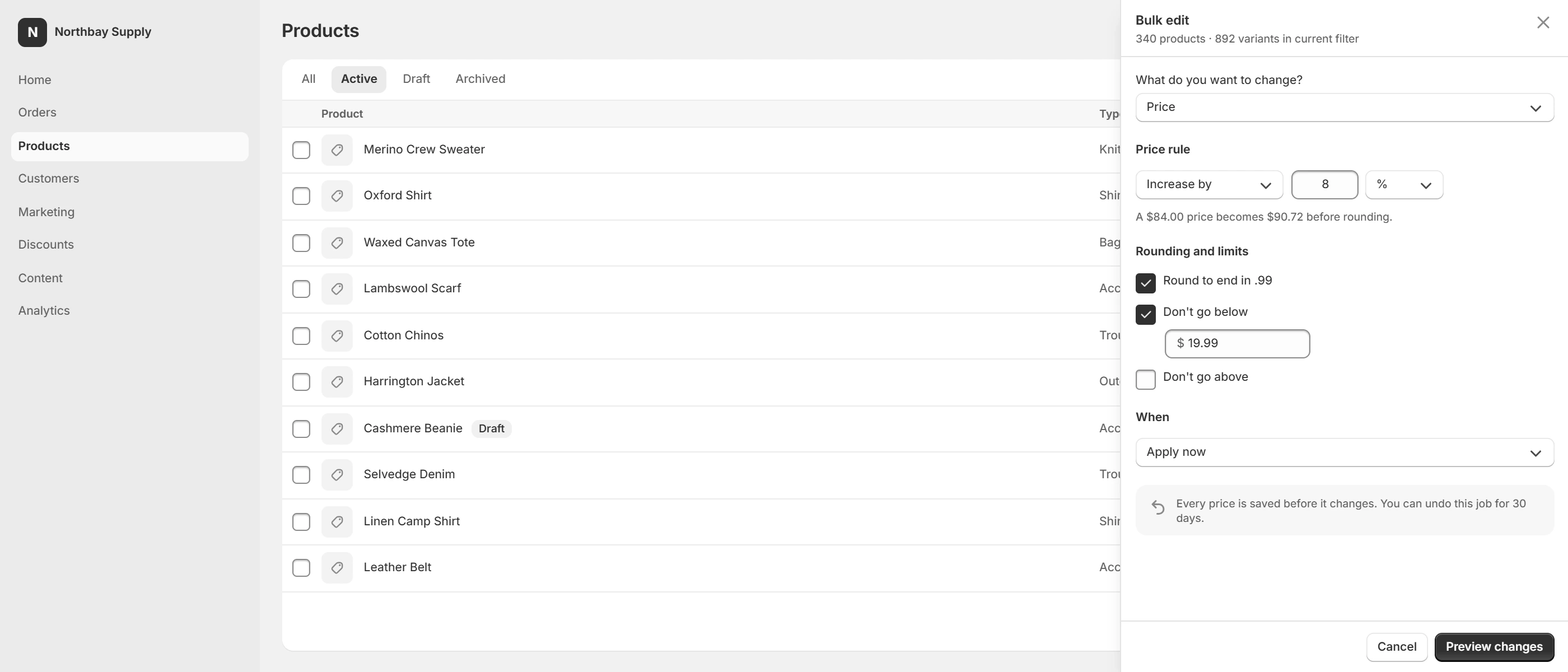
The BulkGauge rule builder open as a slide-over beside a filtered product list in the Shopify admin, showing 340 products and 892 variants in scope
The afternoon you keep losing

Every bulk change today is an export, a spreadsheet and a prayer.

Shopify's own bulk editor handles a screenful. Past that you export a CSV, edit it somewhere else, re-import it, and find out what went wrong afterwards — on the storefront.

BulkGauge keeps the whole operation inside the admin, shows you the exact values it is about to write, and keeps a snapshot of what was there before.

892

variants in one job, priced, rounded and tagged from a single rule.

1 click

to undo a job. Every prior value is snapshotted before it is overwritten.

0

CSV files. Nothing leaves the admin, nothing gets re-imported.

12 mo

of price history on the Compliance plan — enough for an Omnibus record.

How it works

Filter. Rule. Preview. Apply.

01

Filter in the admin

Use the product filters you already know. BulkGauge picks up whatever list is on screen — "340 products in current filter".

02

Write the rule

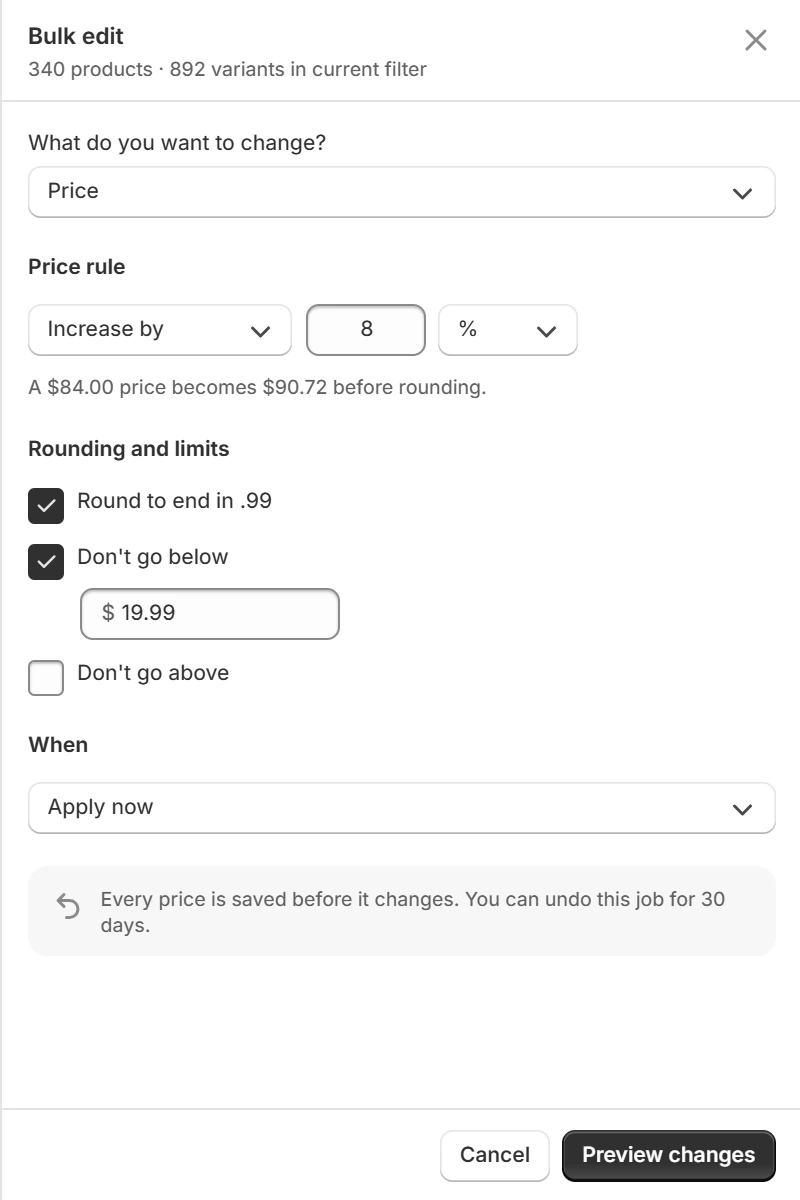
Reduce price by 15%, round to end in .99, add a tag, find and replace in titles, adjust stock, set a metafield. Stack several in one job.

03

Read the diff

A before-and-after table for every affected variant, digits aligned. Nothing is written until you have seen it.

04

Apply — or schedule

Run it now, or set it to start Friday 06:00 and revert itself on Monday. Jobs over 1,000 variants ask you to type the count.

Bulk edit

Rules, not formulas

Price, compare-at price, cost, tags, titles, descriptions, stock, metafields. Percentage or fixed amount, with rounding that ends where you want it to end. Rules stack, and the preview shows the combined result — not each step.

How rules work
The bulk edit rule stack: increase by 8 percent, rounded to end in .99, with a floor of $19.99 so no variant can be discounted below it
Rule chaining

Four steps, one job, one undo

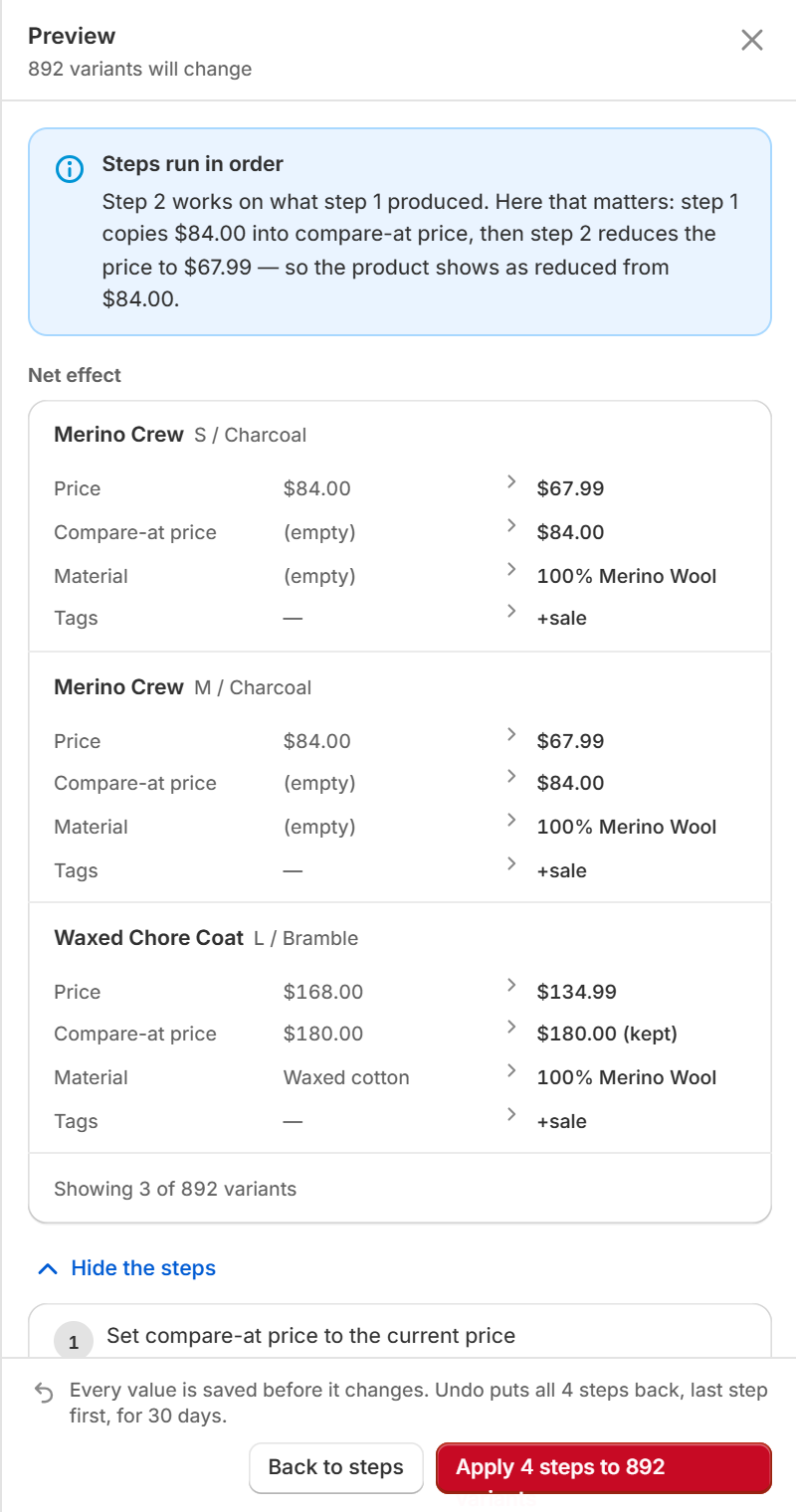
A sale is rarely one change. Copy the price into compare-at price, cut it by 20%, set a material, add a tag — as steps in a single job. The preview shows the net effect on each variant first, and the steps behind it when you ask. Save the chain and run it again next season.

How chains work
A chain preview: the net effect on each variant across price, compare-at price, material and tags, with the per-step breakdown beneath
Scheduler

Sales that start and end themselves

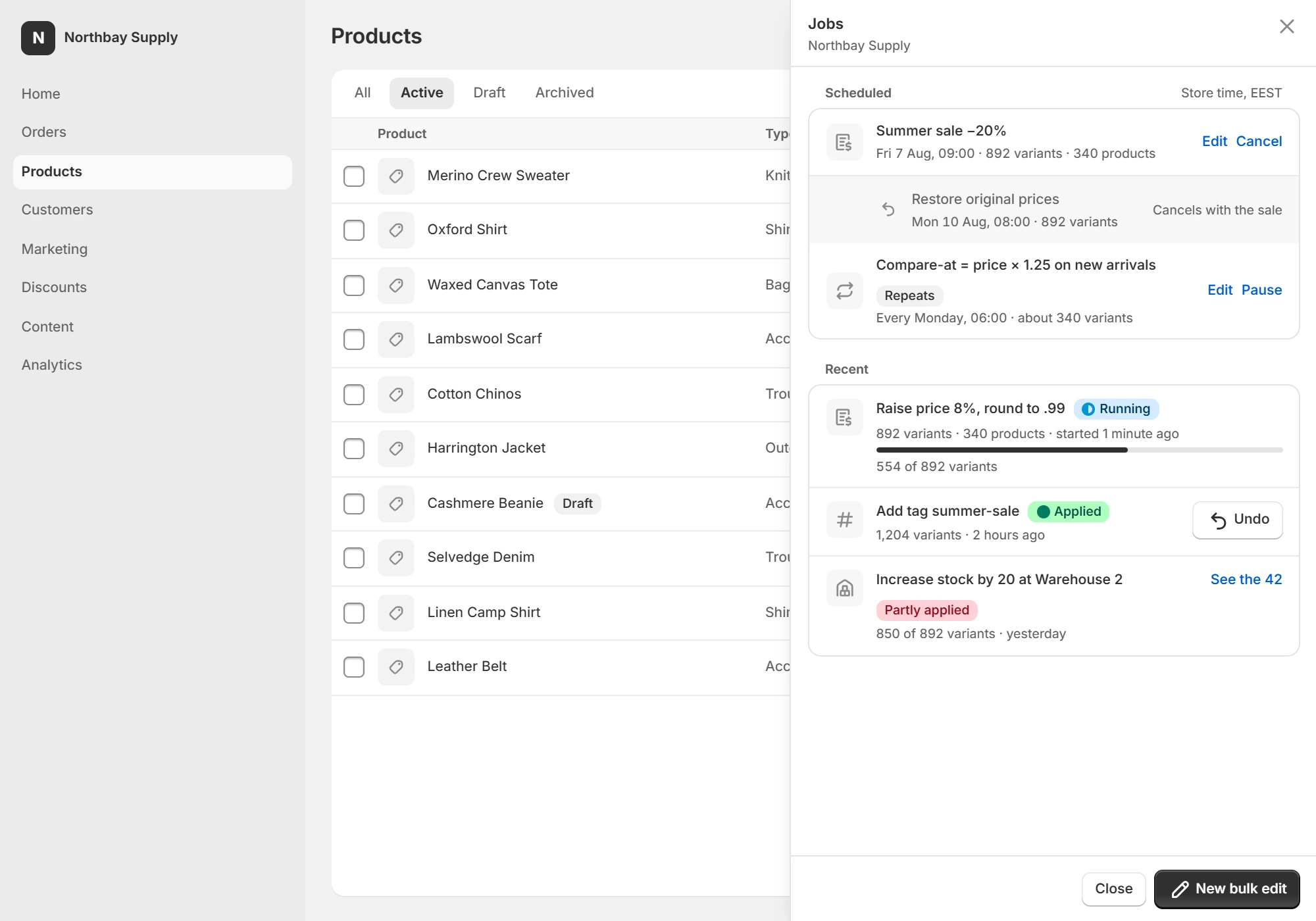
Schedule a job for a date and time in your store's timezone, or define a window: prices drop when it opens and return to their snapshot when it closes. Overlapping windows are flagged before you save, not after they collide.

How scheduling works
The jobs panel showing a Summer sale at minus 20 percent scheduled for 7 August with its restore-original-prices leg on 10 August, above a running job and one that partly applied
Audit & history

Every change, with a date on it

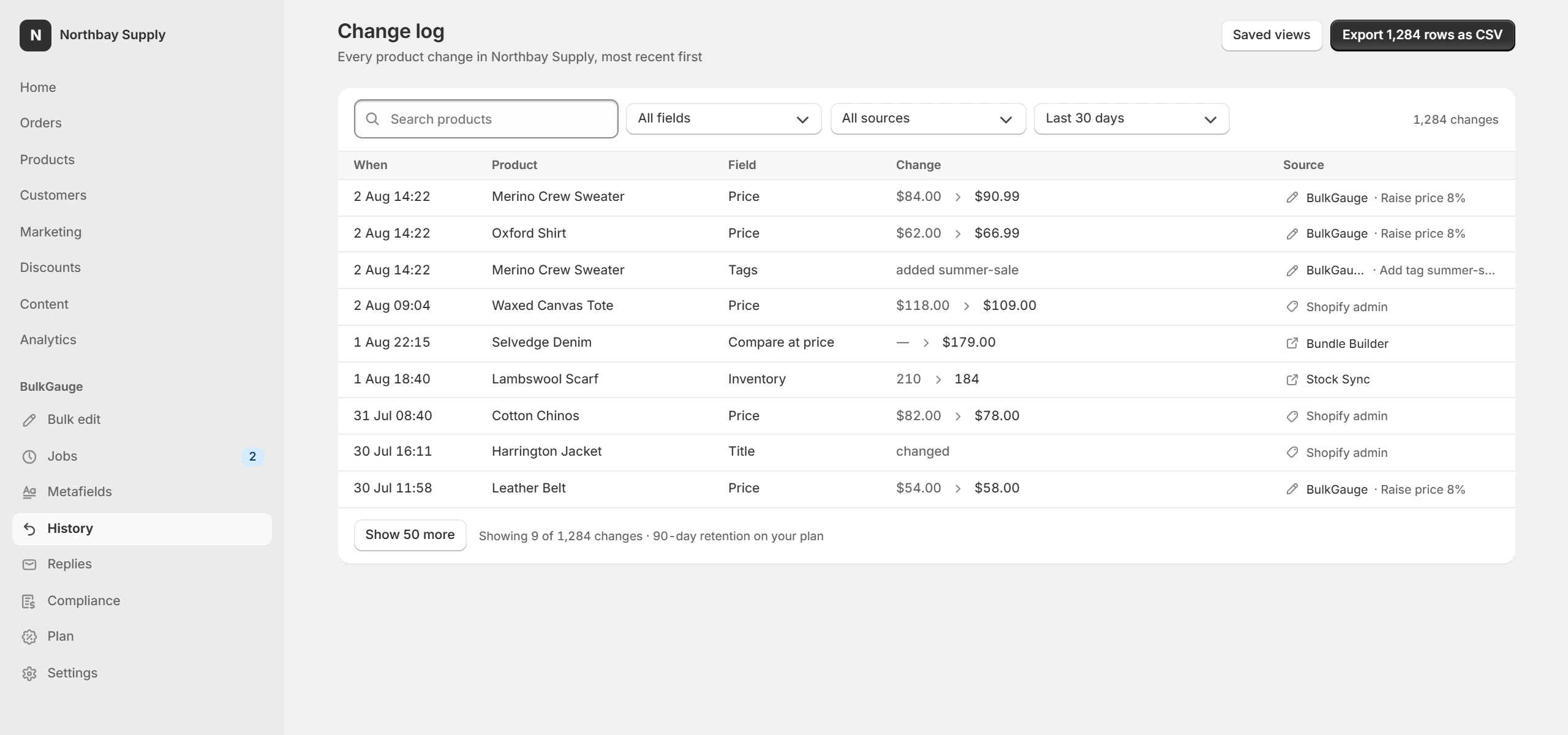
A per-product price history and a store-wide change log, filterable by date, resource and job. Export it to CSV. BulkGauge records changes it can see — where Shopify's webhooks don't name an actor, the log says so rather than guessing.

What gets recorded
The store-wide change log: every product change with its timestamp, field, before and after values, and whether BulkGauge, the Shopify admin or another app made it
Metafields

Metafields in merchant words

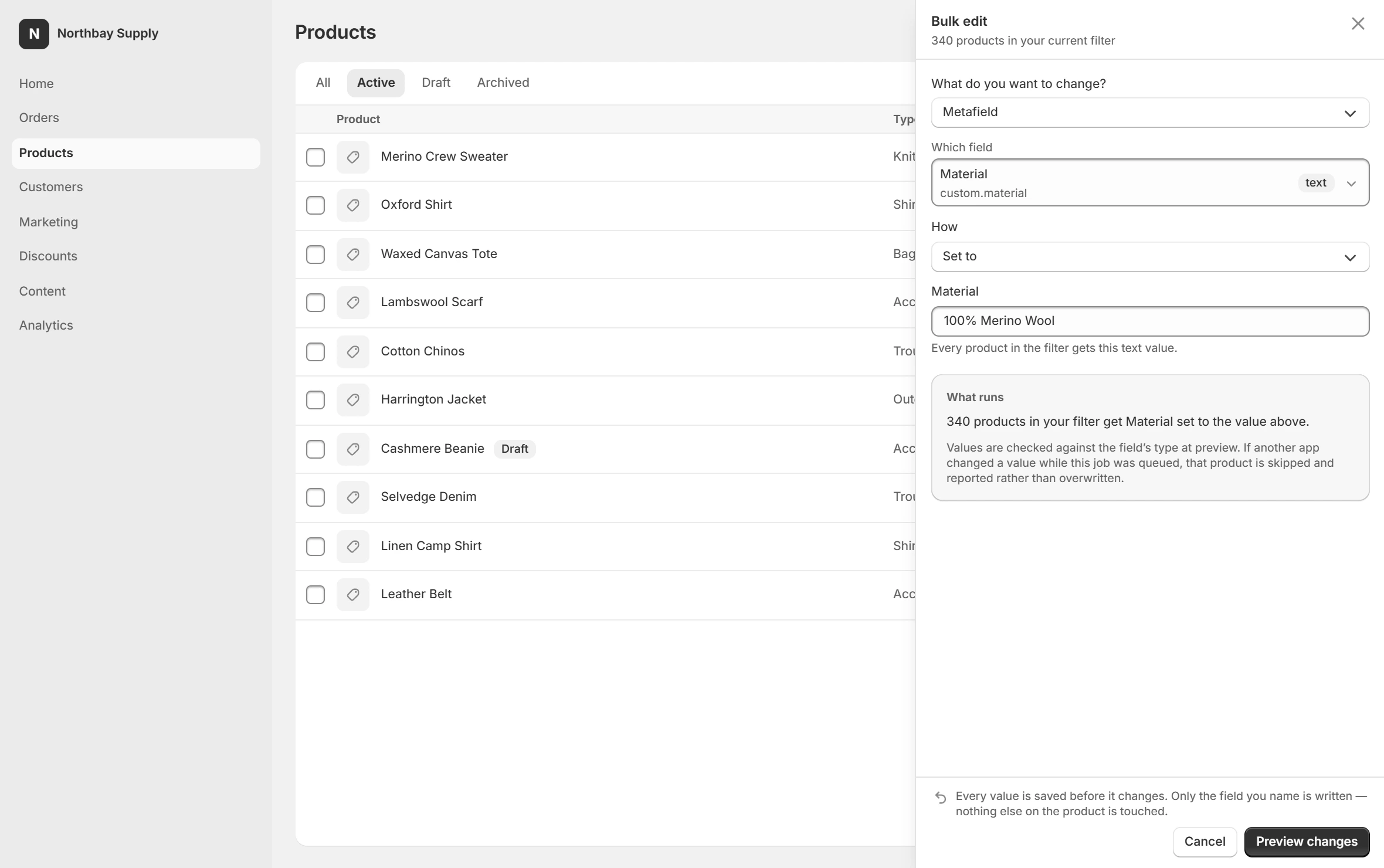
Pick a definition and BulkGauge renders the right control for its type — a reference type never gets a free-text box. It also scans values against Shopify's 16 KB write limit and shows you which ones will fail before you run the job.

Metafield editing
A metafield definition picked from the store’s own definitions, with the value control matched to its type
SEO & alt text

Written per product, not pasted everywhere

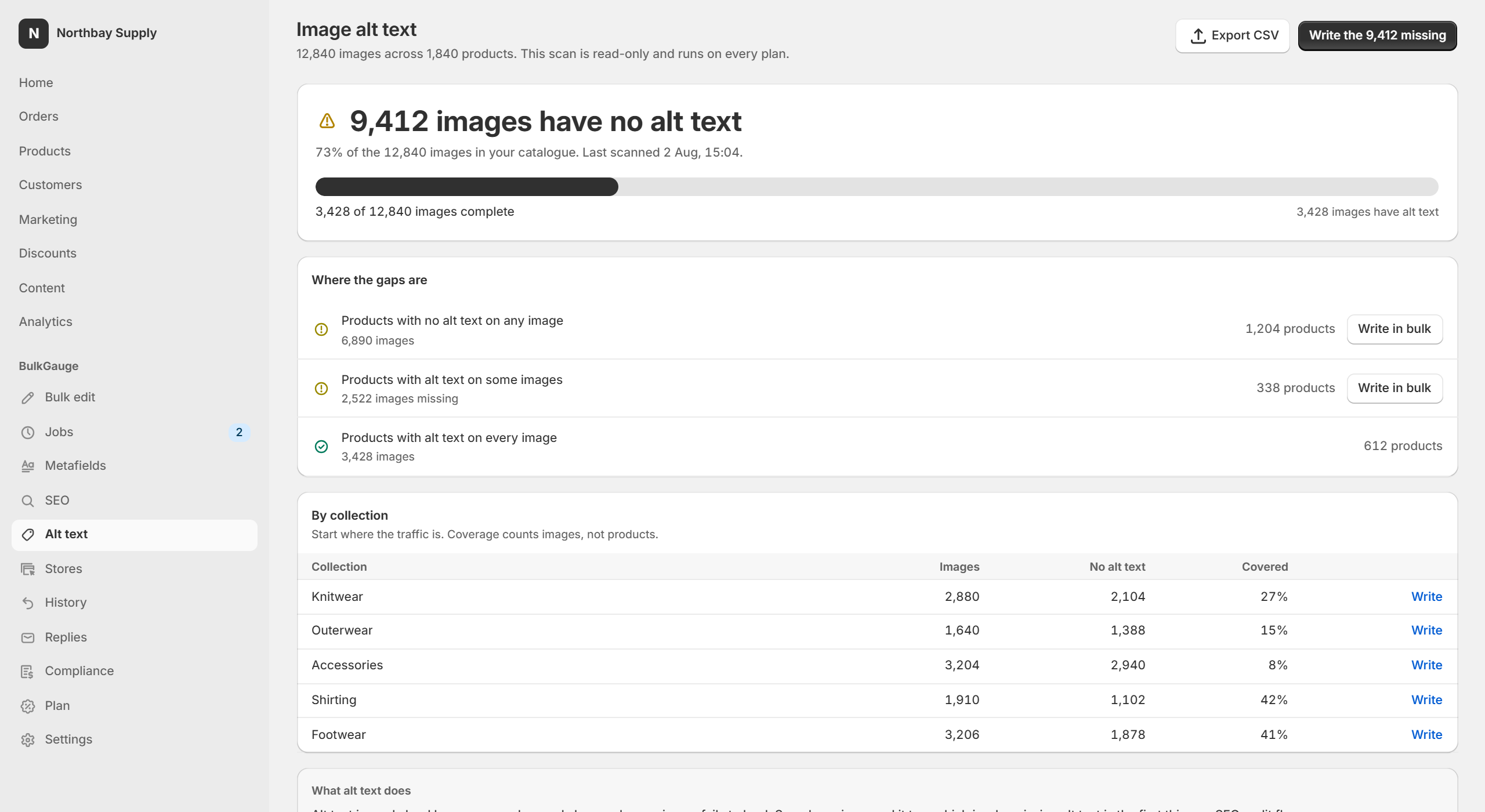
Meta titles and descriptions from templates that resolve per product, with the character count against the limits Google actually shows. Alt text the same way — or described from the image itself, at 1¢ an image described, with the total stated before the job runs.

The alt text coverage audit: 9,412 of 12,840 images have no alt text, broken down by product and by collection
More than one store

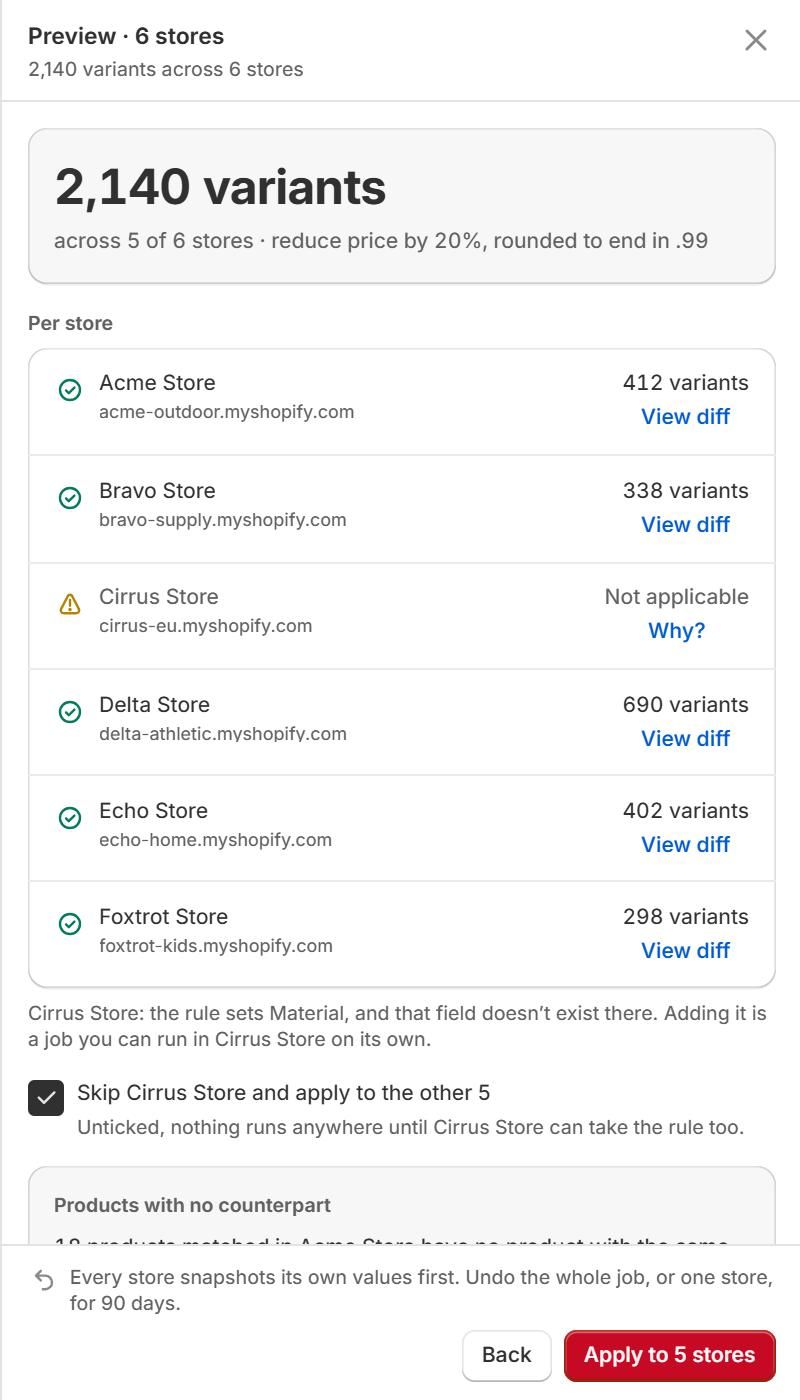
One rule across every store you run

For agencies and multi-brand merchants: a per-store preview, per-store progress and per-store undo, with an apply button that counts stores rather than variants. Amount rules are blocked across stores that don’t share a currency — “set price to 50” means something different in each one.

How multi-store works
The per-store preview: 2,140 variants across six stores, one marked not applicable with the reason, and an apply button counting stores
Compliance

The paperwork the EU now asks for

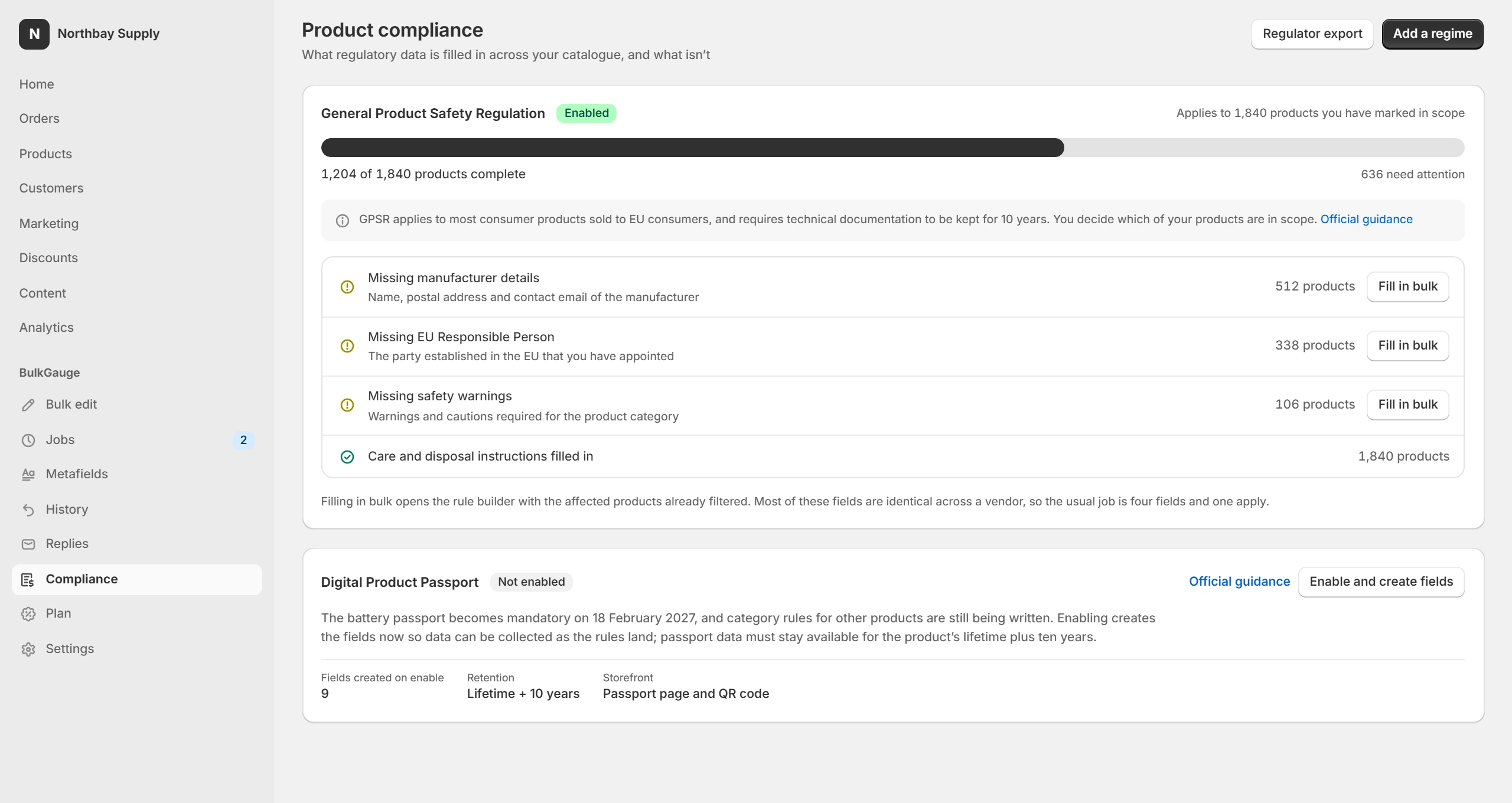
Omnibus requires the lowest price of the previous 30 days next to a discount. GPSR requires safety information on the product page. BulkGauge keeps the price history that proves the first, provides storefront blocks that render both, and exports a record a regulator can read.

Compliance features
The product compliance dashboard: 1,204 of 1,840 products complete for GPSR, with counts of what is missing per field and a Fill in bulk action on each
Free, on every plan

Two read-only scans that tell you where you stand

Alt text coverage

Counts every product image with no alt text, by product and by collection. Most catalogues come back missing two images in three.

See what it reports

Metafield 16 KB check

Measures every metafield against Shopify’s write limit. Anything over it becomes permanently read-only in API 2026-04 — for every app, not just this one.

See what it reports

Both write nothing to your store and run on the free plan. Fixing what they find is what the paid tiers are for.

Pricing

One app, one line on your Shopify invoice

Compare every feature

Billed through Shopify. Charges appear on your existing Shopify invoice — no separate card, no separate account. Prices in USD, excluding tax.

Questions people ask before installing

What can BulkGauge see in my store?

Products, variants, collections, metafields, inventory levels and the price history it records itself. It requests the Shopify scopes needed for those and nothing more. It does not read orders or payouts. The full list is in the privacy policy.

What happens if a job fails halfway?

The job stops, tells you exactly how many variants were written and how many were not, and names the cause — for example, stock owned by a third-party fulfilment app. The written ones stay undoable. You can retry only the failures.

How long can I undo a job?

7 days on Free, 30 on Core, 90 on Growth and 12 months on Scale and Compliance. The undo restores the snapshot taken immediately before the job ran — not a recalculated value.

Does it work with my theme?

Bulk editing does not touch your theme. The Omnibus and GPSR storefront blocks are theme app extensions that inherit your theme's type and colour, and you place them where you want them.

Can I get a refund?

No. Subscriptions are non-refundable, including partial periods — the free plan exists so you can decide before you pay. Cancel any time and you keep access until the period ends. See the no-refund policy.

What happens to my data if I uninstall?

Uninstalling revokes our access and stops your schedules, but your data is still here. About 48 hours later Shopify sends us its erasure request for the store, and everything — job records, snapshots, change history and any restore points we hold — is hard-deleted on receipt. Reinstall before that arrives and your history is intact; after it, there is nothing to restore. Ask us and we run the same deletion immediately.
Install it, filter something, and press preview.

The free plan runs a real 50-variant job. That is enough to see whether the undo does what this page says it does.